Affiliate/Ads disclaimer: Some links on this blog are affiliate/ads links to support this project going on, meaning I may earn a commission at no extra cost to you.

How to Make n8n Templates Production-Ready

Turn any template into production-grade, error-free automation in 12 mutually-exclusive & collectively-exhaustive steps — n8n Post-Import Checklist (MECE)
You just imported an n8n workflow, hit Execute, and… nothing.
Webhook 404? Credential 401? Empty data blob?
90% of failures happen after the import.
We MECE-split the aftermath into 12 checks and one Mermaid flow.
3 minutes, zero overlap, no missing—your template is now safe to run unattended.
Bookmark this page; tick the boxes every time you import.
Table of Content
Step 0: Prerequisites
□ 0.1 Environment fit: Node.js & n8n version ≥ template requirement
□ 0.2 Back-up: Git snapshot or local download before you touch anything
Step 1: Static Config (visible without execution)
□ 1.1 Credential inventory: list every credential the template uses; fill or create
□ 1.2 Constants & variables: URLs, ports, DB names, index names, time-zones → move to env vars if they should differ per stage
□ 1.3 Node state: reactivate any nodes the author disabled for demo
Step 2: Dynamic Validation (first run)
□ 2.1 Minimal data test: trigger with a single item, watch end-to-end
□ 2.2 Log level: set LOG_LEVEL=debug, confirm no 401/403/404/ETIMEDOUT
□ 2.3 Data mapping: ensure payload keys from Node n match input keys of Node n+1; handle empty values so they don’t break the flow
□ 2.4 Rate & concurrency: if Loop or HTTP Request nodes exist, set sane Rate Limit and Retry to avoid 429 bans
Step 3: Production Hardening (long-term)
□ 3.1 Error handling: attach Error Trigger or “Continue On Fail” to every node that can throw
□ 3.2 Time-outs & retries: global Timeout + Max Retries; DB nodes ≥ 30 s connect timeout
□ 3.3 Secret rotation: switch to OAuth2 / Service Account; calendar reminder every 90 d
□ 3.4 Monitoring: enable native Prometheus metrics or a Webhook alert—page the owner after ≥2 consecutive failures
Mermaid Flow of n8n Template Import Checking
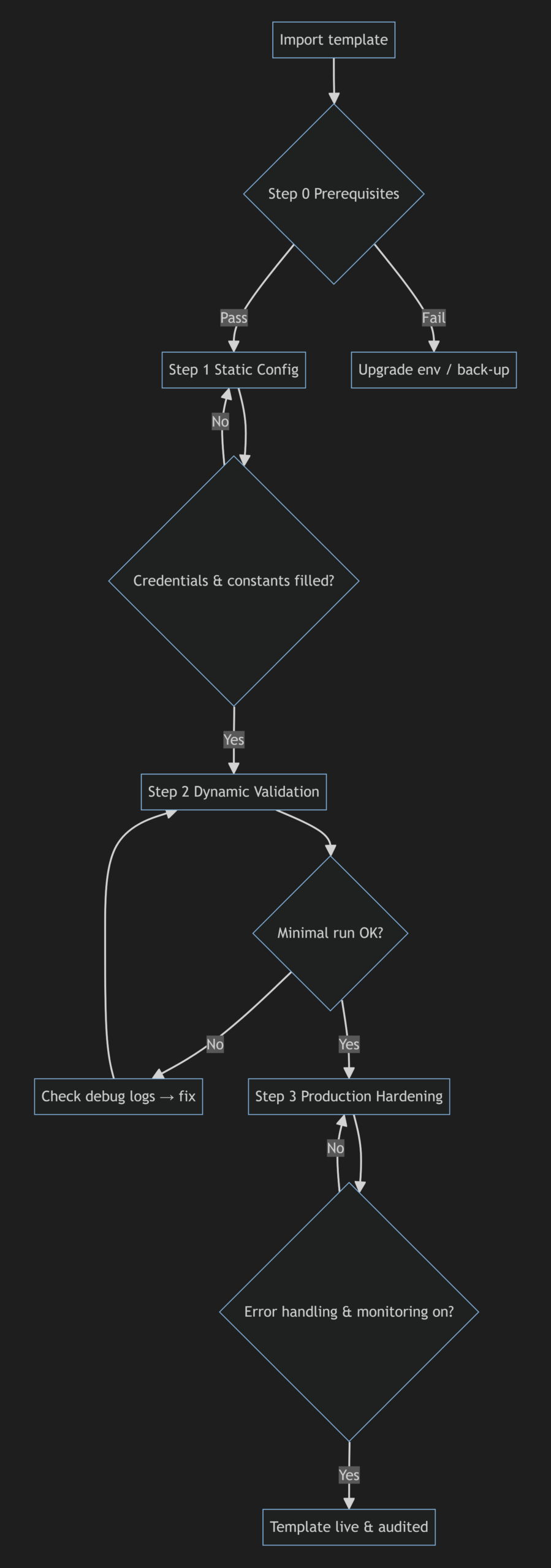
Here we show you the process and logic flow on how to go through the n8n template for importing and deploying:
flowchart TD
    A[Import template] --> B{Step 0 Prerequisites}
    B -->|Pass| C[Step 1 Static Config]
    B -->|Fail| Z[Upgrade env / back-up]
    C --> D{Credentials & constants filled?}
    D -->|No| C
    D -->|Yes| E[Step 2 Dynamic Validation]
    E --> F{Minimal run OK?}
    F -->|No| G[Check debug logs → fix]
    G --> E
    F -->|Yes| H[Step 3 Production Hardening]
    H --> I{Error handling & monitoring on?}
    I -->|No| H
    I -->|Yes| J[Template live & audited]
The above is just mermaid text to flowchart code. If you’d love to have an image to view and save, then you have it:
How to use
- Duplicate the checklist into a Notion database; convert items to checkboxes.
- Create a new row per imported template; tick = progress bar.
- When Step 3 is fully checked, mark the row “Delivered” and set a 90-day rotation reminder.
Templates are no longer black boxes—they’re versioned, revertible, and team-ready.